쓰레드(Thread)
프로그램 내에서 독립적으로 실행되는 하나의 작업 단위
멀티 쓰레드(Multi-Thread) 구현
- Thread 클래스를 상속받아 쓰레드 구현 가능
- Thread.run() 메서드를 오버라이드 해서 쓰레드가 수행할 작업 정의 가능
- start() 메서드로 새로운 쓰레드가 생성되고 run()으로 실행됨
ex) 쓰레드 2개가 각각 0~9까지 출력하는 멀티 쓰레드 프로그램
public class MyThread extends Thread{

    @Override
    public void run() {
        String threadName = Thread.currentThread().getName();
        System.out.println("::: " + threadName + "쓰레드 시작 :::");

        for (int i = 0; i < 10; i++) {
            System.out.println("현재 쓰레드: " + threadName + " - " + i);

            try {
                Thread.sleep(500);
            }
            catch (InterruptedException e) {
                e.printStackTrace();
            }
        }
        System.out.println("::: " + threadName + "쓰레드 종료 :::");
    }
}
public class Main {
public static void main(String[] args) {
System.out.println("::: main 쓰레드 시작");
MyThread thread0 = new MyThread();
MyThread thread1 = new MyThread();
System.out.println("::: main 이 thread0 을 실행");
thread0.start();
System.out.println("::: main 이 thread1 을 실행");
thread1.start();
}
}
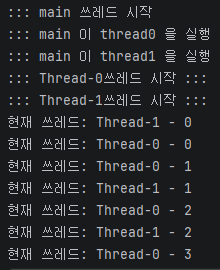
*쓰레드 실행 시, run()을 사용하면 새로운 쓰레드에서 시작하는게 아니라 현재 쓰레드에서 실행된다.
Join()
- main() 쓰레드가 다른 쓰레드가 종료될 때까지 기다리게 하는 메서드
- 모든 작업이 끝난 뒤, 총 작업 완료 시간 측정하는데 유용하게 쓰임
public class Main {

    public static void main(String[] args) {
        System.out.println("::: main 쓰레드 시작");
        MyThread thread0 = new MyThread();
        MyThread thread1 = new MyThread();

        // 시작시간 기록
        long startTime = System.currentTimeMillis();

        // 1. thread0 시작
        System.out.println("thread0 시작");
        thread0.start();

        // 2. thread1 시작
        System.out.println("thread1 시작");
        thread1.start();

        // ⌛️ main 쓰레드 대기 시키기
        try {
            thread0.join();
            thread1.join();
        } catch (InterruptedException e) {
            e.printStackTrace();
        }

        long endTime = System.currentTimeMillis();
        long totalTime = endTime - startTime;
        System.out.println("총 작업 시간: " + totalTime + "ms");
        System.out.println("::: main 쓰레드 종료");
    }
}
Runnable 인터페이스 활용
Runnable 인터페이스를 활용해 쓰레드를 구현하는 것을 권장
유지보수성과 재사용성 향상
- Thread 클래스를 상속받아 MyThread()를 구현하면 MyThread()가 실행 로직과 쓰레드 제어 로직 모두를 담당하게 됨 (쓰레드 제어 로직 : start(), join(), isAlive() 등)
- 하나의 클래스는 하나의 책임만을 가지는게 유지 보수에 좋음
- Runnable을 활용하면 실행 로직을 별도의 구현체로 분리 가능
// MyThread에 있는 실행 로직만 그대로 복붙
public class MyRunnable implements Runnable {
    @Override
    public void run() {
        String threadName = Thread.currentThread().getName();
        for (int i = 0; i < 10; i++) {
            System.out.println("현재 쓰레드: " + threadName + " - " + i);
            try {
                Thread.sleep(500);
            } catch (InterruptedException e) {
                e.printStackTrace();
            }
        }
    }
}
public class Main {
public static void main(String[] args) {
// 쓰레드 실행 로직 객체 (작업 객체)
MyRunnable task = new MyRunnable();
// 쓰레드 제어를 위해 제공되는 Thread 클래스
Thread thread0 = new Thread(task); // 작업 객체 공유
Thread thread1 = new Thread(task); // 작업 객체 공유
// 실행
thread0.start();
thread1.start();
}
}
기존 클래스를 유지하면서 확장 가능
- MyThread()처럼 Thread를 상속하면 다른 클래스 상속 불가능 (Java는 클래스 다중 상속 불가능) -> 확장성이 떨어짐
- Runnable은 인터페이스이므로 기존 클래스의 기능을 유지하면서 상속을 통해 확장 가능
public class MyNewClass {

    public void printMessage() {
        System.out.println("MyClass 기능 실행");
    }
}
public class MyRunnable extends MyNewClass implements Runnable {
@Override
public void run() {
String threadName = Thread.currentThread().getName();
for (int i = 0; i < 10; i++) {
System.out.println("현재 쓰레드: " + threadName + " - " + i);
try {
Thread.sleep(500);
} catch (InterruptedException e) {
e.printStackTrace();
}
}
}
}public class Main {
public static void main(String[] args) {
MyRunnable task = new MyRunnable();
// 기존 클래스를 유지하면서 확장해서 활용
task.printMessage();
Thread thread0 = new Thread(task);
Thread thread1 = new Thread(task);
thread0.start();
thread1.start();
}
}'Java > 기본 문법' 카테고리의 다른 글
| Collection 주요 기능 - Map (0) | 2026.06.11 |
|---|---|
| Collection 주요 기능 - List (0) | 2026.06.11 |
| 스트림(Stream) (0) | 2026.06.04 |
| 인터페이스(interface) (0) | 2026.06.04 |
| 람다(Lambda) (0) | 2026.05.21 |


