프로젝트 Git 주소
https://github.com/wjdals0508/spring-advanced
GitHub - wjdals0508/spring-advanced: 코드 개선 과제
코드 개선 과제. Contribute to wjdals0508/spring-advanced development by creating an account on GitHub.
github.com
시나리오 1
누군가가 git에 올린 프로젝트를 가져왔다. 근데 빌드부터가 안되네?
이 프로젝트.... 내가 집도한다.
트러블 슈팅

일단 빌드가 안 된다... 에러 코드를 찾아보자.
Unable to start embedded Tomcat
// 톰캣 임베드 실패했음. 왜? ↓

Error creating bean with name 'filterConfig' defined in file [D:\workspace\~~]:
// filterConfig 라는 빈 생성에 실패 했기 때문에. 왜? ↓

Unsatisfied dependency expressed through constructor parameter 0:
// 생성자 파라미터에 문제가 있었기 때문에. 왜? ↓

Error creating bean with name 'jwtUtil':
// jwtUtil이라는 빈 생성에 실패 했기 때문에. 왜? ↓

Injection of autowired dependencies failed
// @Autowired 필드/생성자 주입에 에러가 났기 때문에. 왜? ↓

Could not resolve placeholder 'jwt.secret.key' in value "${jwt.secret.key}"
// {jwt.secret.key}를 찾기 못했기 때문에!!!
{jwt.secret.key} 값을 찾지 못 했기 때문에 빌드 에러가 났다.
그럼 JwtUtil 클래스를 확인해보자.
@Slf4j(topic = "JwtUtil")
@Component
public class JwtUtil {

    private static final String BEARER_PREFIX = "Bearer ";
    private static final long TOKEN_TIME = 60 * 60 * 1000L; // 60분

    @Value("${jwt.secret.key}") // 찾았다!
    private String secretKey;
    private Key key;
    private final SignatureAlgorithm signatureAlgorithm = SignatureAlgorithm.HS256;

    @PostConstruct
    public void init() {
        byte[] bytes = Base64.getDecoder().decode(secretKey);
        key = Keys.hmacShaKeyFor(bytes);
    }

    public String createToken(Long userId, String email, UserRole userRole) {
        Date date = new Date();

        return BEARER_PREFIX +
                Jwts.builder()
                        .setSubject(String.valueOf(userId))
                        .claim("email", email)
                        .claim("userRole", userRole)
                        .setExpiration(new Date(date.getTime() + TOKEN_TIME))
                        .setIssuedAt(date) // 발급일
                        .signWith(key, signatureAlgorithm) // 암호화 알고리즘
                        .compact();
    }

    public String substringToken(String tokenValue) {
        if (StringUtils.hasText(tokenValue) && tokenValue.startsWith(BEARER_PREFIX)) {
            return tokenValue.substring(7);
        }
        throw new ServerException("Not Found Token");
    }

    public Claims extractClaims(String token) {
        return Jwts.parserBuilder()
                .setSigningKey(key)
                .build()
                .parseClaimsJws(token)
                .getBody();
    }
}
위와 같이 @Value 어노테이션으로 secretkey 변수에 주입되도록 코딩되어 있는 것을 확인 할 수 있다.
@Value는 application.properties에 저장된 값을 가져오는 것이므로, application.properties을 확인해보려 했다.
근데 없었다.
아마 git에 올릴 때, application.properties이 누락된 것 같다.
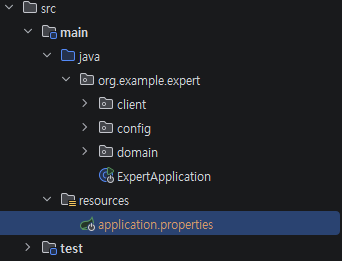
위와 같이 application.properties를 추가해준 뒤, 안에 jwt.secret.key 값을 선언해줬다. (+DB, 로그 설정)
spring.application.name=spring-advanced


# DataSource 설정
spring.datasource.driver-class-name=com.mysql.cj.jdbc.Driver
spring.datasource.url=jdbc:mysql://localhost:3306/commerce_db?serverTimezone=Asia/Seoul&useSSL=false&allowPublicKeyRetrieval=true&characterEncoding=UTF-8
spring.datasource.username=root
spring.datasource.password=1234


# JPA 설정
spring.jpa.hibernate.ddl-auto=update
spring.jpa.show-sql=true
spring.jpa.properties.hibernate.format_sql=true


# 로그 설정
logging.level.root=info
logging.pattern.console=%d{HH:mm:ss.SSS} [%-5level] : %msg%n

jwt.secret.key=abcedefhijklmnopqrstudwasthajsdlkjafsjklsdafjfsa
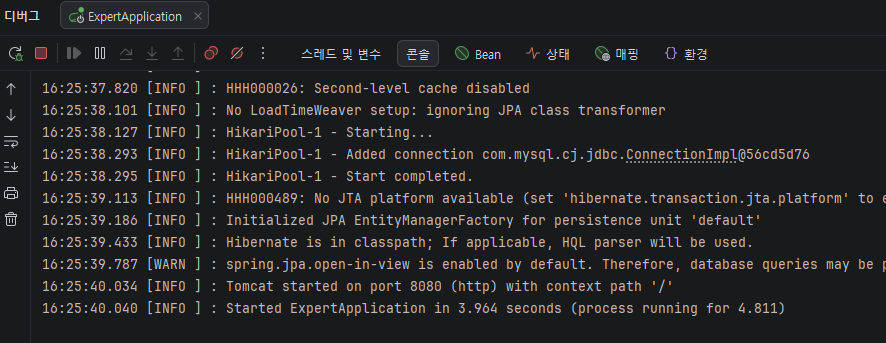
트러블 슈팅 후 확인
▼ 빌드에 성공해서 서버가 올라온 것을 확인 할 수 있다.
'Spring > - [시리즈] Spring 프로젝트 되살리기' 카테고리의 다른 글
| Spring 프로젝트 되살리기 6 - 유닛 테스트 코드 고치기 (0) | 2026.07.25 |
|---|---|
| Spring 프로젝트 되살리기 5 - 코드 리팩토링 3 (@EntityGraph 적용) (0) | 2026.07.25 |
| Spring 프로젝트 되살리기 4 - 코드 리팩토링 2 (@Valid 적용) (0) | 2026.07.25 |
| Spring 프로젝트 되살리기 3 - 코드 리팩토링 1 (중첩 if문 제거 등) (0) | 2026.07.24 |
| Spring 프로젝트 되살리기 2 - ArgumentResolver 이슈 해결 (0) | 2026.07.24 |


